// trade breakdown in the journal
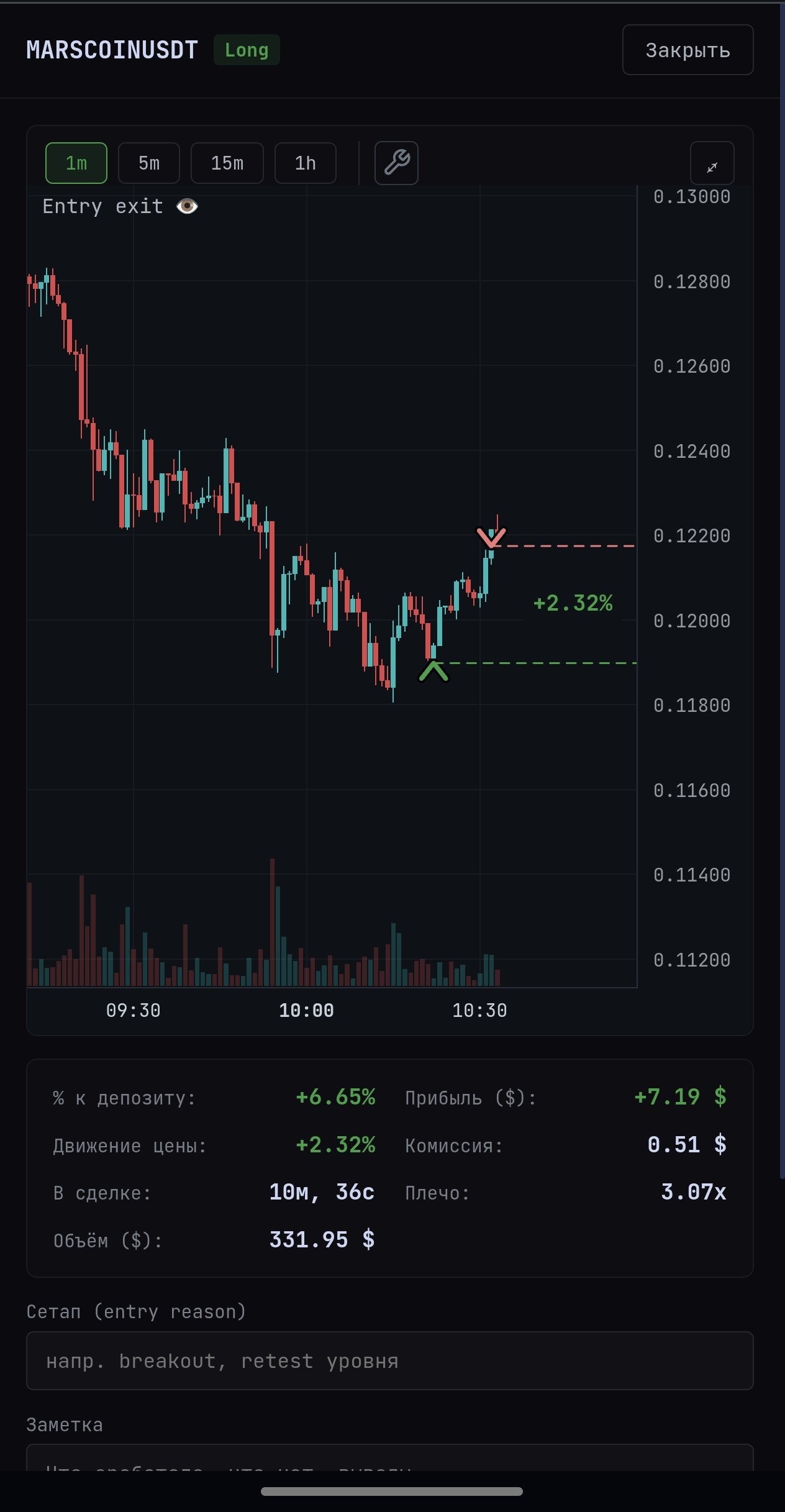
TRADE CHART WITH ENTRY/EXIT MARKERS, PNL, FEE AND LEVERAGE
Connect a read-only API key from Binance, Bybit or Vataga Crypto — SiftX automatically collects your trade history, PnL, funding and open positions. No manual entry into spreadsheets.
| Pair | Side | Entry | Exit | Size | PnL | Duration |
|---|---|---|---|---|---|---|
| BTCUSDT | Long | 96,840.0 | 97,420.0 | 0.42 | +243.60 | 14m |
| ETHUSDT | Short | 3,201.2 | 3,182.5 | 2.1 | +39.27 | 32m |
| SOLUSDT | Long | 181.30 | 178.40 | 18 | -52.20 | 8m |
Connect a read-only API key for Binance, Bybit or Vataga Crypto — SiftX pulls your entire closed-trade history automatically, no CSV, no manual transfer.
Profit and loss broken down by day, week, month, year, or per individual trade — see exactly where the drawdown or the growth comes from.
A candlestick chart with entry and exit markers — see what the price was actually doing around the trade, not just the PnL number.
Full trade history: pair, side, size, entry/exit, PnL, duration. Paginated, no lag even with large trade volumes.
Account balance and funding payments update in real time over WebSocket — no manual page refresh needed.
Current open positions with precise holding time and unrealised PnL, updating on every change.
| Feature | SiftX Journal | Excel / Google Sheets | Manual notes |
|---|---|---|---|
| Trade import | ✓ automatic | manual | manual |
| PnL chart by period | ✓ | build it yourself | — |
| Trade chart with entry/exit points | ✓ | — | — |
| Live balance and funding | ✓ | — | — |
| Transfer error risk | none | high | high |
| Withdrawal access required | not required | — | — |
In your Binance, Bybit or Vataga Crypto settings, create an API key with read-only permissions — no trading, no withdrawals.
Paste the API key and secret into the trading journal. SiftX starts backfilling your trade history automatically.
PnL chart, trades table, per-trade chart with entry and exit — everything updates on its own.
A trading journal isn't bookkeeping for its own sake. It's the only way to see your real statistics, instead of what "feels" true after a few lucky trades.
A chart broken down by day/week/month shows the real trajectory of your capital, instead of the handful of standout trades that stick in memory harder than the losing ones.
A trader's memory is selective — an entry can feel like it was "on signal," while the chart often shows an entry in the middle of a move or against a higher-timeframe trend.
The journal uses a Binance, Bybit or Vataga Crypto API key with read-only access — it can't trade or withdraw funds. That separates tracking from key-compromise risk.
Connect Binance, Bybit or Vataga — history, PnL and trade charts right after sign-up.
Sign Up Free